

When cutting sheet material to size, every square centimetre counts. Nesting is the art of arranging many parts on a sheet so that waste is kept to a minimum. For series producers and businesses with a high material turnover, that is real money, and a decisive competitive advantage.
In this guide you will learn how nesting works, what prerequisites you need and how to get the most out of your sheet material.
What is nesting?
Nesting (from the English verb to nest, meaning to fit parts together) refers to the optimised arrangement of cut parts on raw material. Instead of making each part individually, many parts are cut from one sheet at the same time, arranged intelligently like pieces of a puzzle.
The Principle
- You define all required parts with their quantities
- The nesting software arranges the parts on the sheet optimally
- Parts are rotated and mirrored for the best possible fit
- The CNC milling machine cuts all parts in one pass
- Minimal waste, maximum efficiency
Manual vs. Automatic Nesting
Manual nesting: You arrange the parts yourself on screen. This works for a few simple parts, but quickly becomes confusing and suboptimal.
Automatic nesting: The software calculates the optimum arrangement. It takes rotation, mirroring, spacing and even the material grain into account. Indispensable for complex jobs.
Advantages of Nesting
Material Savings
The most obvious advantage: less waste.
- Typical saving: 10–30% less material consumption compared with individual production
- With expensive materials (plywood boards, aluminium, acrylic) this pays off quickly
- Fewer offcuts: stock keeping becomes simpler
Time Savings
Nesting saves not only material but also time:
- Fewer workpiece changes: clamp one sheet instead of ten individual parts
- Optimised toolpaths: the software calculates the shortest connections
- Unattended operation: long runs overnight are possible
- More output per shift: higher productivity in the same working time
Quality and Consistency
- All parts from the same batch: identical material properties
- Same colour batch: important for furniture and visible parts
- Reproducible: repeat orders exactly like the original
Requirements for Efficient Nesting
The Right Machine
Nesting places particular demands on the CNC milling machine:
Travel:
- At least as large as your standard sheet size
- Half a sheet (1250 x 2500 mm) is the minimum for professional nesting
- Full sheet (2500 x 2500 mm or larger) for maximum efficiency
Clamping system:
- Vacuum table is practically a must for nesting
- Quick sheet changes without re-clamping
- Parts stay in position even after being cut free
- Zone switching for different sheet sizes
Spindle and power:
- Sufficient power for continuous operation (at least 3–5 kW)
- Good cooling during long run times
- Optional: tool changer for different operations
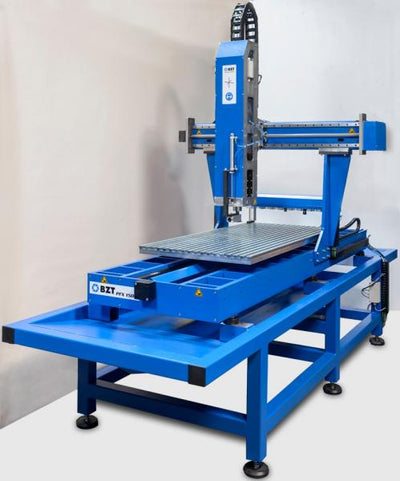
BZT recommendation: Our PFU-S, PFG-S and PFH series are ideally designed for nesting, with travel of up to several metres. Vacuum tables are available as an option.
Nesting Software
The CAM software must support nesting. Important functions:
| Function | Benefit |
|---|---|
| Automatic arrangement | Parts are placed optimally, faster than manually |
| Rotation | Parts are rotated for better use of the area |
| Mirroring | Mirrored parts allow a tighter arrangement |
| Grain consideration | For wood: parts only in the permitted direction |
| Shared cutting lines | Neighbouring parts share the separating cut |
| Spacing control | Minimum spacing between parts is adjustable |
| Multi-sheet nesting | The job is distributed across several sheets |
Popular nesting software:
- VCarve Pro / Aspire: integrated nesting, beginner-friendly
- Fusion 360: nesting function in the Manufacturing section
- IMOS, Cabinet Vision: specifically for furniture making
- Alphacam: professional nesting solution
Suitable Workpieces
Nesting works best with:
- Flat 2D parts: through cuts or 2.5D machining
- Uniform material thickness: all parts from the same sheet thickness
- Sufficient quantity: worthwhile from approx. 5–10 parts per sheet
- Not too small parts: they must still be held by the vacuum
Typical Nesting Applications
| Industry | Typical parts | Material |
|---|---|---|
| Furniture making | Carcass parts, shelves, back panels, drawer parts | MDF, chipboard, plywood |
| Sign making | Signs, lettering, displays, trade fair structures | Forex, Dibond, acrylic |
| Packaging | Inserts, cushioning, moulded parts | Foam, corrugated cardboard |
| Model making | Ribs, formers, structural parts | Plywood, balsa |
| Interior fit-out | Wall cladding, acoustic panels | MDF, wood-based materials |
| Shop fitting | Shelving, display furniture | MDF lacquered, plywood |
Practical Tips for Successful Nesting
Shared Cutting Lines (Shared Cuts)
When two parts lie directly next to each other, the separating cut can be used for both:
- Time saving: shorter toolpath, faster machining
- Material saving: no double kerf
- Important: the kerf (cutter width) must be taken into account correctly in the software
Holding Tabs
With through cuts, the parts would otherwise fall loose onto the base, or be pulled along by the cutter.
Solution: tabs (holding tabs)
- Small material bridges hold the part in position
- After milling: break or saw off the tabs, re-sand the edge
- Typical tab size: 3–5 mm wide, 0.5–1 mm high
Alternative: onion skinning
- A thin layer of material is left standing (0.2–0.5 mm)
- Parts can simply be pushed out after milling
- Less rework than with tabs
Dust Extraction During Nesting Runs
Long nesting runs produce large quantities of chips. Good dust extraction is a must:
- Clean cuts: no chips between cutter and material
- Vacuum hold: chips under the workpiece impair the vacuum effect
- Fire hazard: especially with MDF and chipboard
- Visibility: you must be able to monitor the process
Using a Spoilboard
A spoilboard (MDF or chipboard) should lie under the workpiece:
- Protects the vacuum table from damage
- Makes it easy to cut all the way through
- Adds extra stability
Nesting and Vacuum Clamping
Vacuum clamping and nesting go together like hand and glove:
Advantages of Vacuum Clamping in Nesting
- Quick sheet changes: vacuum on, place the sheet, done
- No re-clamping: the whole sheet is machined in one setup
- Parts stay in position: the remaining area holds even after parts are cut free
- Free toolpath: no obstructive clamping elements in the way
What should you look out for?
- Minimum part size: very small parts do not have enough vacuum area
- Airtight sheets: porous materials (open-pored wood) hold less well
- Zone switching: switch off zones that are not needed for a better hold
- Sealing cords: additional sealing for critical parts
Economic Considerations
Is nesting worthwhile for your business? An example calculation:
Starting Point
- Material: MDF 19 mm, €50 per sheet (2500 x 1250 mm)
- Requirement: 100 parts of various sizes per week
- Without nesting: 15 sheets per week (a lot of waste)
- With nesting: 10 sheets per week (optimised arrangement)
Savings
- 5 sheets x €50 = €250 per week
- Per year: €13,000 material savings
- Plus: time savings through fewer workpiece changes
Advanced Nesting Strategies
True-Shape Nesting
For complex shapes, true-shape nesting uses the actual contour instead of an enclosing rectangle. Irregular shapes nest better, which leads to significantly higher material utilisation with organic contours.
Offcut Management
Professional businesses also manage their offcuts digitally. For new jobs, the software first checks the offcut stock, for maximum material utilisation across several jobs.
FAQ: Frequently Asked Questions about Nesting
From what quantity is nesting worthwhile?
Nesting makes sense from as few as 5–10 parts per sheet. The time needed for the nesting calculation is minimal, and the material savings are noticeable immediately.
Do I need special nesting software?
Not necessarily. Many CAM programs offer integrated nesting. Specialised nesting software is worthwhile for complex jobs with hundreds of parts.
Can I combine different material thicknesses in one nest?
No, a nest always contains parts of the same material thickness. For different thicknesses, create separate nests.
What do I do with the remaining areas?
Good nesting software shows the remaining areas. You can keep larger offcuts for smaller jobs; some software even manages an offcut stock.
Conclusion: Nesting Is a Must for Series Producers
For businesses that regularly process sheet material, nesting is not an option, it is an economic must. The combination of a large CNC gantry milling machine, vacuum clamping and good nesting software delivers maximum efficiency with minimal material waste. The investment often pays for itself within a few months.
More CNC Applications
Are you planning to get started with nesting? Our technical team will gladly advise you on the optimum machine configuration and suitable vacuum solutions. Contact us.




0 comments