

Are you interested in CNC technology and want to buy your first milling machine? Then you probably know the feeling: the choice is huge, the price differences are enormous and the technical data seem to speak a language of their own.
Do not worry: this is how most CNC beginners feel. Whether you are a hobbyist, model maker or aspiring small-business owner, your first CNC milling machine is an important investment that deserves careful thought. This guide takes you step by step through all the important decisions, from the basic question “Kit or ready-built machine?” to choosing the right accessories.
By the end, you will know exactly which machine suits your requirements.
What is a CNC milling machine?
CNC stands for “Computer Numerical Control”, that is, computer-controlled numerical control. A CNC milling machine is a machine tool that automatically machines material according to digital specifications. The rotating cutter moves precisely along several axes (usually X, Y and Z) and removes material to create the desired shape.
Unlike a manual milling machine, where you carry out every movement yourself, a gantry mill works to a preprogrammed sequence. You create your design on the computer, the CAM software calculates the toolpaths, and the machine executes them exactly, piece by piece, path by path.
The advantages for beginners: - Reproducible results: programmed once, produced as often as you like - High precision even without years of craft experience - Complex shapes that could hardly be made by hand - Time savings on series parts
Kit vs. Ready-Built Machine
One of the first fundamental decisions: do you build your CNC milling machine yourself, or do you buy a fully assembled machine?
CNC Kits: Tempting and Cheap, but …
Kits from the Far East tempt with prices under €500. That sounds like a cheap way to get started, but caution is advised.
Typical problems with cheap kits: - Low rigidity of the construction - Imprecise guides with a lot of play - Weak spindles that can only machine soft material - Missing or inadequate documentation - No support when problems occur
If you only want to engrave thin plywood, you may get by with one. But as soon as you machine harder materials or expect precise results, these machines quickly reach their limits.
Ready-Built Machines: An Investment in Quality
A high-quality ready-built machine costs more, but it offers decisive advantages:
- Ready to use immediately: unpack, set up, get started
- Guaranteed precision: set and tested at the factory
- Professional support: a contact person for questions
- Expandability: a well-thought-out system for later accessories
- Durability: robust construction for years of use
BZT tip: Even our most compact entry-level models of the PF series come with ball screws and achieve a repeatability of 0.02–0.03 mm. That is a fundamental difference from hobby kits.
Which materials do you want to machine?
The choice of the right machine type depends largely on the materials you want to machine. The harder the material, the more rigid and capable the machine has to be.
Material Overview for Beginners
| Material | Difficulty | Requirements | Recommended BZT series |
|---|---|---|---|
| Softwood, MDF, plywood | Easy | Good dust extraction, moderate spindle | PF, PFK, PFI |
| Hardwood (beech, oak) | Medium | More rigid construction, more power | PF, PFE, PFU |
| Plastic (acrylic, POM) | Medium | Coolant/air, adapted spindle speed | PF, PFE, PFU |
| Aluminium | Demanding | High rigidity, MQL lubrication | PFE, PFU, PFU-S |
| Brass, bronze | Demanding | Very rigid construction | PFU-S, PFH, PFX |
Our advice: Before buying, define clearly which materials you want to machine now, and which may be added in the future. Upgrading a machine that is too weak is usually uneconomical.
Choosing the Right Size
Understanding Travel Ranges
The travel ranges indicate how far the cutter can move in the X, Y and Z directions. They determine the maximum workpiece size:
- X axis: movement in length
- Y axis: movement in width
- Z axis: movement in height (plunge depth)
Example: A machine with a travel range of 600 x 400 x 110 mm can machine workpieces up to approx. 60 x 40 cm. The Z axis of 110 mm allows machining of materials up to about 10 cm thick.
Planning for Space Requirements
Do not forget: the machine needs more space than its travel ranges suggest. Allow for:
- Footprint of the machine (approx. 20–30 cm larger than the travel range)
- Working area for operation (at least 60 cm at the front)
- Space for the controller, PC and accessories
- Room for chip disposal and dust extraction
Compact Models for Small Workshops
Little space? These BZT series are particularly space-saving:
- PFK series: compact design, ideal for engraving and small prototypes
- PFI series: benchtop mill with a fixed gantry and integrated controller
Software and Control
A CNC milling machine is only as good as the software that controls it. For beginners, it is important to understand how the components work together.
The Workflow: From Idea to Finished Part
- CAD software (Computer-Aided Design): this is where your 2D or 3D design is created
- CAM software (Computer-Aided Manufacturing): calculates the toolpaths from the design
- CNC control software: transmits the commands to the machine and controls the movement
Important for Beginners
When buying a machine, make sure the controller is compatible with common CNC software. Proprietary systems can restrict you in the long term.
Popular starter solutions: - Fusion 360: CAD and CAM in one package, a good free way to get started - Estlcam: German software, particularly beginner-friendly - VCarve: focus on 2.5D machining, intuitive operation
With BZT machines, you are free to choose your software: our controllers are compatible with all common programs.
Avoiding Typical Beginner Mistakes
Learn from the experience of others. These are mistakes we see beginners make again and again:
Mistake 1: Buying Too Cheap
“I will just buy something cheap to try it out.” This thought often leads to frustration. A bad machine gives a false impression of CNC technology and in the end costs double: first the cheap machine, then a sensible one.
Mistake 2: Underestimating Accessories
The machine alone is not enough. Budget from the start for: - Cutters and tools - Clamping devices (vice, hold-downs, vacuum table) - Dust extraction for chips - Safety glasses and hearing protection
Mistake 3: Ignoring Support
With your first CNC milling machine, questions will come up, guaranteed. A German manufacturer with real telephone support is worth its weight in gold, especially for beginners. Cheap suppliers without a contact person leave you on your own if problems occur.
Mistake 4: Thinking Too Big
“Better to get a big machine straight away, in case I ever …” Bigger means more expensive, heavier and more space-consuming. Start with a machine that suits your current projects. You can always upgrade later.
BZT Entry-Level Models at a Glance
As a German manufacturer with more than 25 years of experience, we offer various series for getting started with CNC:
PF Series: The Classic
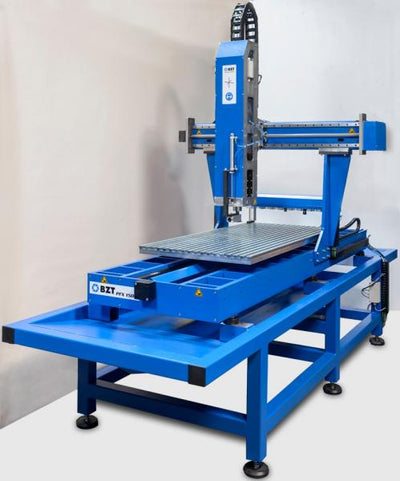
The PF series is our proven entry into the CNC world: - Open frame construction for good accessibility - Ball screws for precise positioning - Various sizes from 600 x 400 to 1500 x 1020 mm - Optional T-slot plates for flexible workholding
Ideal for: woodworking, plastic, first aluminium trials
PFK Series: Compact and Stable
When space is limited but the quality has to be right: - Small machine dimensions - Semi-professional applications - Perfect for engraving and prototypes
Ideal for: small workshops, engraving shops, jewellery making
PFE Series: Professional Entry
For ambitious beginners who want more: - Industrial construction - Versatile applications - Also suitable for more demanding materials
Ideal for: craft businesses, sign making, model making
Comparison Table of Entry-Level Models
| Feature | PF series | PFK series | PFE series |
|---|---|---|---|
| Construction | Open frame | Compact | Enclosed |
| Travel ranges | 600–1500 mm | 300–600 mm | 500–1200 mm |
| Material range | Wood, plastic, aluminium | Wood, plastic, aluminium | Wood, plastic, aluminium, non-ferrous metals |
| Area of use | Hobby to commercial | Engraving, prototypes | Commercial, industrial |
| Special feature | Flexible, proven | Space-saving | Professional |
FAQ: Frequently Asked Questions
Do I need prior knowledge for a CNC milling machine?
Basic PC skills and manual dexterity are enough to get started. Operating a modern CNC milling machine can be learned; more important than prior knowledge is the willingness to get to grips with CAD/CAM software. Many manufacturers offer briefings and training, and you will find numerous tutorials on the internet.
Can I mill aluminium with an entry-level CNC machine?
Yes, but the machine has to be designed for it. Kits and very cheap machines usually cannot machine aluminium, or only with severe limitations. High-quality entry-level models such as our PF or PFE series machine aluminium without problems, provided you use the right parameters and, if necessary, minimum quantity lubrication.
Which accessories do I need to get started?
Essential: - Basic set of cutters (end mills, engraving cutters) - Clamping devices to suit your workpieces - Dust extraction, or at least a vacuum cleaner connection - Safety glasses
Useful: - Tool length sensor for easy setup - Additional cutters for different materials - Spoilboards as a base
Conclusion: Quality Pays Off
Getting started in the CNC world is an investment, in technology but also in your own skills. With the right machine, you will quickly see success and develop a pleasure in precision manufacturing.
Our advice: Do not buy compromises. A high-quality entry-level milling machine from a German manufacturer offers you reliability, support and future-proofing. That is worth more than a few euros saved on a machine that ends up standing in the corner after a few months.
Do you have questions about choosing a machine? Our technical team will be happy to advise you, personally and competently. Call us or use our contact form.


0 comments