

The question of the right number of axes is one of the most important when buying a CNC machine. Do you really need 5 axes, or are 3 enough? This comparison explains the differences and helps you decide.
What do the axes actually mean?
The Three Basic Axes (X, Y, Z)
Every CNC milling machine has at least three linear axes:
- X axis: movement left/right
- Y axis: movement forwards/backwards
- Z axis: movement up/down (tool infeed)
With these three axes the cutter can reach any point in the working area, but always only from above.
The Rotary Axes (A, B, C)
Additional rotary axes allow rotating movements:
- A axis: rotation about the X axis
- B axis: rotation about the Y axis
- C axis: rotation about the Z axis
A 5-axis machine combines the three linear axes with two rotary axes, typically A+C or B+C.
Understanding 3-Axis Machining
How It Works
In 3-axis machining the tool always stands perpendicular to the clamping surface. The machine can only enter the material from above.
Advantages of 3-Axis Machining
- Simpler programming: CAM software is cheaper and easier to use
- Lower machine costs: fewer components, simpler mechanics
- Robust construction: fewer moving parts means less wear
- Larger working area: no rotary axes take up space
- Faster set-up: simply clamp the workpiece and go
Limits of 3-Axis Machining
- No undercuts: the tool cannot reach under overhangs
- Repeated re-clamping: to machine all sides, the workpiece has to be turned
- Limited surface quality: steep angles produce stair-stepping effects
- Complex freeform surfaces: only possible with compromises
Understanding 5-Axis Machining
How It Works
The tool can tilt and rotate relative to the workpiece. This lets the cutter reach places that would be inaccessible with 3 axes.
Two Designs
| Design | Description | Advantages | Disadvantages |
|---|---|---|---|
| Swivel head | The spindle can tilt | The large working area is retained | More complex spindle head, more expensive |
| Swivel table | The workpiece is tilted/rotated | Simpler spindle, less expensive | The working area becomes smaller |
Advantages of 5-Axis Machining
- Complex geometries: undercuts and organic shapes are possible
- Single clamping: machine all sides in one setup
- Better surfaces: the tool can be aligned optimally to the material
- Shorter tools: less overhang, more stability
- Higher productivity: less re-clamping on complex parts
Disadvantages of 5-Axis Machining
- Higher investment: the machine costs significantly more
- More complex programming: CAM software is more expensive, the learning curve is steeper
- Risk of collision: more degrees of freedom mean more possible collisions
- Maintenance effort: more moving parts require more care
The Direct Comparison
| Criterion | 3-axis | 5-axis |
|---|---|---|
| Purchase cost | Lower | Significantly higher |
| CAM software | Inexpensive to free | Expensive (€1,000–10,000+) |
| Learning effort | Moderate | High |
| Geometric freedom | Limited | Very high |
| Surface quality on freeform shapes | Good | Excellent |
| Productivity, simple parts | High | Equal or lower |
| Productivity, complex parts | Low (much re-clamping) | High |
| Maintenance effort | Low | Higher |
Typical Applications
Ideal for 3-Axis
- Sheet machining: cutting to size, nesting, signs
- 2.5D parts: pockets, contours, holes
- Front panels and housings: rectangular parts machined from above
- Wood and plastic parts: furniture making, model making
- Engraving: signs, lettering
Ideal for 5-Axis
- Impellers and turbine blades: complex flow geometries
- Mould making: injection moulds with undercuts
- Medical technology: implants, prostheses
- Aerospace: structural components from solid material
- Sculptures and art: organic freeform surfaces
The Middle Way: 3+2-Axis Machining
There is a middle way: in 3+2 machining (also called indexed 5-axis) the workpiece is brought into a fixed angular position and then machined in 3 axes.
Advantages of 3+2
- Machine several sides: without manual re-clamping
- Simpler programming: every position is normal 3-axis machining
- Cheaper software: many 3-axis CAM programs can do 3+2
- Lower risk of collision: no simultaneous 5-axis movement
Limits of 3+2
- No true freeform surfaces: facets only
- Visible transitions: between the different angular positions
Decision Guide: Which System Suits You?
Choose 3-axis if:
- You mainly machine sheet material (wood, plastic, aluminium)
- Your parts are accessible from one side
- Budget and simplicity matter more than maximum geometric freedom
- You are getting started and want to gain experience first
Choose 5-axis if:
- You need to produce complex freeform surfaces
- Undercuts and recesses occur regularly
- The highest surface finish on freeform shapes is required
- A single clamping improves accuracy
- You work in mould making, aerospace or medical technology
Choose 3+2 (4th axis) if:
- You need multi-sided machining but no true freeform surfaces
- Round parts are to be machined on the 4th axis
- The budget does not stretch to true simultaneous 5-axis machining
BZT Solutions for Different Requirements
Our gantry mills offer flexible options:
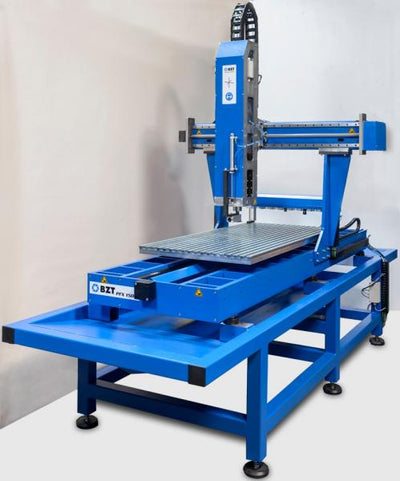
- PFE series: 3-axis as standard, prepared for the 4th and 5th axis (5-axis ready)
- PFU-S series: robust 3-axis basis, expandable with a swivel table
- 4th axis can be retrofitted: for round parts and 3+2 machining
You can start with 3 axes and expand later. The machines are designed for this.
FAQ: Frequently Asked Questions
Can I upgrade a 3-axis machine to 5-axis later?
Partly. A 4th axis (rotary table or dividing head) can be retrofitted to most machines. For true simultaneous 5-axis machining, however, you need a swivel head or table, which is not structurally possible on many machines. BZT machines of the PFE series are designed 5-axis ready.
Is 5-axis worthwhile for hobby users?
Rarely. The extra effort in cost, software and learning curve usually only pays off for complex parts in series. For hobby use, 3-axis with an optional 4th axis is almost always enough.
Is 5-axis programming difficult?
Yes, the learning curve is much steeper. You have to understand collision avoidance, tool orientation and complex toolpaths. Expect several months of familiarisation for advanced 5-axis strategies.
Conclusion: The Right Number of Axes for Your Application
More axes mean more possibilities, but also more complexity and cost. Most users are best served by 3 axes. Only those who regularly machine complex freeform surfaces or undercuts really benefit from simultaneous 5-axis machining.
Our recommendation: start with 3 axes and a 4th-axis option. This covers 90% of all applications. If you find you are reaching the limits, you can always expand.
Related Guides
Are you unsure which axis configuration you need? Describe your typical workpieces to us and we will be glad to advise you.



0 comments